Signalator Notify · Watchdog

Restart failed Windows apps and trading terminals before silence becomes downtime.

Signalator Watchdog extends Notify Health from awareness to controlled local recovery. It monitors selected Windows applications and trading terminals, detects when they close, stop responding, or need a controlled preventive restart before accumulated memory and resource usage turns into a hang.

Restart if closed Non-responding / hung detection Scheduled maintenance restart Preventive terminal refresh Local restart history and logs
Watchdog recovery flow Local rules
Selected app or terminal Closed, frozen, or due for preventive restart
Watchdog rule Cooldowns and plan limits checked
Recovery attempt Restart action logged locally
MT4 terminal closed Restart-if-closed rule triggered
Restart
Application not responding Hung detection found a frozen window
Hung
Preventive MT5 restart Scheduled refresh before resource buildup becomes a freeze
Logged
App Watchdog Terminal Watchdog Local rules Notify visibility
Health alerts you. Watchdog helps recover.

Notify Health tells you when a Windows machine or terminal stops reporting. Watchdog adds controlled local restart rules for selected Windows applications and trading terminals, including scheduled preventive restarts for long-running platforms that accumulate memory, handles, and load over time.

Compare with Health
Module scope

One Watchdog module, two practical monitoring profiles.

Watchdog should not be limited to MetaTrader only. The Windows app can monitor ordinary applications and also provide a dedicated terminal profile for MT4, MT5, and later cTrader.

App Watchdog

Monitor selected Windows applications used in your operational workflow. Add apps from a detected running list or choose an executable manually when needed.

  • Detect running Windows applications
  • Restart if a selected app closes unexpectedly
  • Detect non-responding windows and apply recovery rules
  • Use scheduled restart for controlled maintenance

Terminal Watchdog

Monitor trading-terminal profiles separately from generic Windows applications, with room for trading-aware safety rules as the product matures.

  • MT4 and MT5 terminal profiles
  • Detect terminals or add executable paths manually
  • Manual restart, restart-if-closed, hung detection, and scheduled restart
  • Preventive refresh for long-running MT4/MT5 terminals with many EAs
  • Later: restart only when terminal-side trading state is safe
Actual Windows app interface

Real local Watchdog controls inside Signalator Notify Windows.

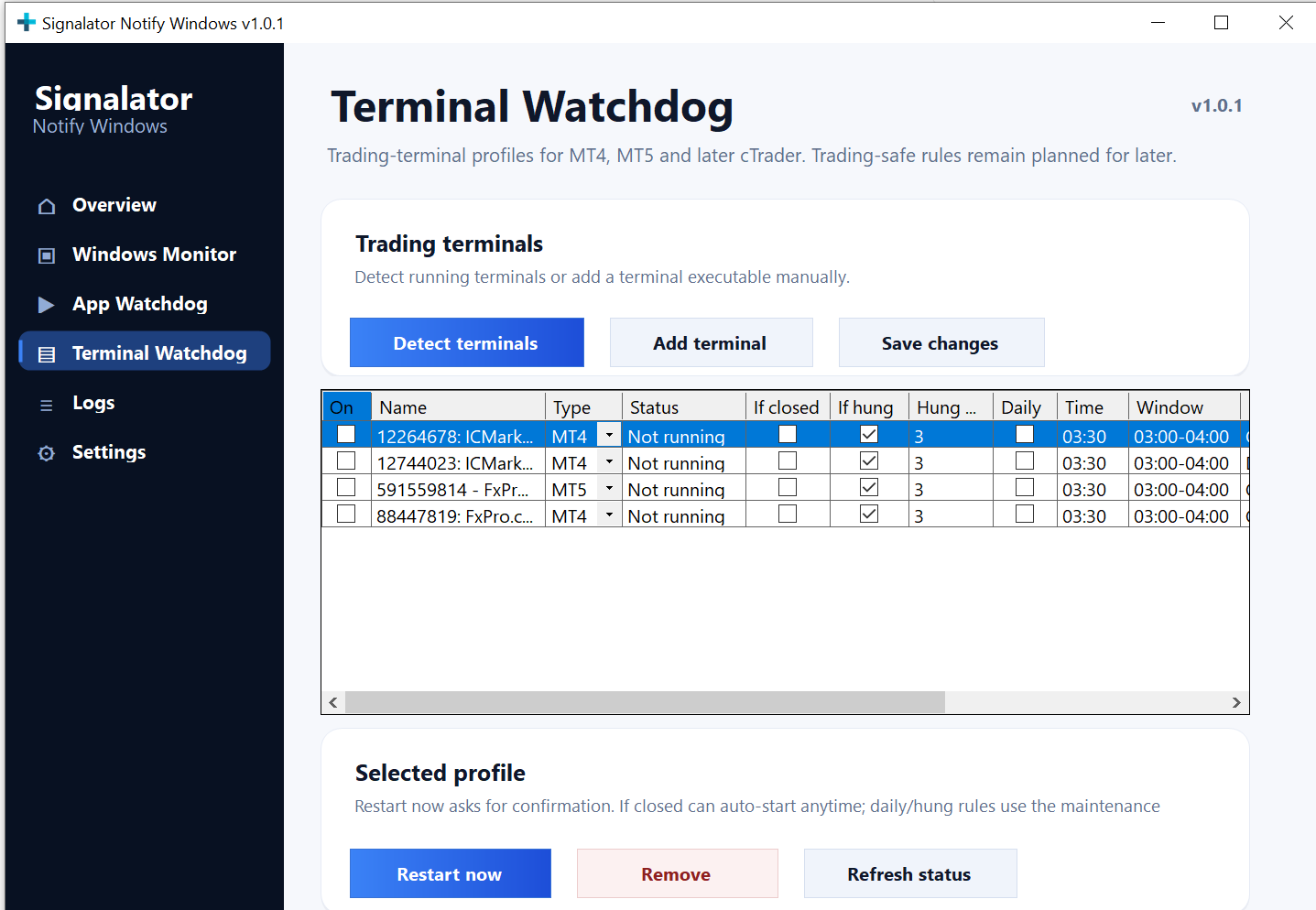
Watchdog rules are configured inside the Windows app. You can detect terminals, add profiles, enable restart rules, run manual restart actions, refresh local status, and review what happened without treating the browser dashboard as the only recovery surface.

Terminal profiles Rule toggles Local history
Signalator Notify Windows Terminal Watchdog screen showing terminal profiles, restart rules, status, and selected profile actions.
Screenshot path: /images/website/signalator-notify-windows-terminal-watchdog.png
Preventive terminal maintenance

Some restarts should happen before the terminal hangs.

Long-running trading platforms are not always meant to run untouched forever. More charts, more EAs, more indicators, and more uptime can gradually increase memory use, handles, CPU pressure, and general instability. A planned restart is often cleaner than waiting for MT4 or MT5 to freeze at the worst moment.

Resource usage builds up over time

Normal platform operation can accumulate memory and internal state, especially when terminals run for days with multiple charts, indicators, and EAs.

More EAs means more pressure

The more automation loaded into one terminal, the more important it becomes to treat restarts as controlled maintenance rather than emergency repair.

MT5 often needs fresh starts

Many active MT5 setups benefit from scheduled restarts before accumulated load becomes a visible freeze, delay, or non-responding window.

Several terminals become routine work

With three, five, or more platforms on one or several VPS machines, manual restarts become a repetitive operational chore that Watchdog can structure and log.

Why this matters

A live VPS does not always mean your critical apps are alive.

Watchdog fills the gap between passive monitoring, preventive maintenance, and manual remote-desktop checking. It focuses on local Windows-observable conditions that can be detected and acted on safely.

A VPS can be alive while the app is dead

Windows may still run, but MT4, MT5, a bridge tool, or another operational application may be closed.

A frozen app can still look present

The process can exist while the window is not responding. Hung detection helps distinguish “running” from usable.

Manual checking does not scale

Opening multiple VPS sessions just to confirm apps are alive wastes time and still leaves blind intervals.

Recovery time matters

Health alerts reduce discovery time. Watchdog can reduce recovery time when restart rules are appropriate.

Accumulated RAM usage becomes a real risk

A terminal may still be running, but long uptime and heavy EA usage can gradually create enough resource pressure that a planned restart becomes operationally necessary.

MT5 restarts are often part of maintenance

For active MT5 environments, regular controlled restarts can be a practical stability measure, especially when several terminals must be maintained at once.

What Watchdog gives you

Controlled local recovery instead of blind restart loops.

The goal is not aggressive automation. The goal is a rule-based local recovery layer with explicit configuration, cooldowns, limits, and logs.

Discovery

Detect running apps

Select applications from the current running process list instead of forcing every user to browse manually for executable paths.

terminal64.exe · detected report-tool.exe · detected Add selected app
Recovery

Restart if closed

Relaunch a selected application or terminal when it exits unexpectedly and the rule is enabled for that profile.

DetectedMT4 Receiver closed unexpectedly.
ActionRelaunch attempted and recorded in local history.
Frozen app

Non-responding detection

Detect hung application windows where the process still exists but the app no longer responds normally.

Responsiveness check
Not responding detected
Maintenance

Scheduled maintenance restart

Restart selected applications or terminals during a defined maintenance window to clear accumulated process state before instability turns into a hang.

03:10 local time Maintenance window Restart then relaunch
Control

Cooldowns and attempt limits

Reduce dangerous restart loops with cooldowns, max attempts, and disabled-by-default restart rules.

Cooldown 10 minutes Max attempts 3 per hour Default Restart off until enabled
Audit trail

Local action history

Keep a clear record of what Watchdog detected, what it attempted, and whether recovery succeeded or was skipped.

Closed app detected Restart attempted Relaunch confirmed

How it works

From selected executable to logged recovery action.

01

Select an app or terminal

Use Detect running apps, Detect terminals, or manual executable selection to create a monitored profile.

02

Enable local rules

Choose restart-if-closed, non-responding detection, or preventive scheduled restart rules only where they make operational sense.

03

Watchdog detects failure

The local Windows app observes closed processes, hung windows, or scheduled maintenance windows.

04

Recovery is attempted and logged

Watchdog restarts the app when allowed, skips when blocked by limits, and records the result for review.

Safety boundaries

Controlled recovery, not reckless automation.

A Watchdog page should be credible. It should clearly say what local software can recover and where external infrastructure or terminal-side trading state is required.

What Watchdog can do

  • Restart selected Windows applications and terminals
  • Detect closed processes and non-responding windows
  • Use scheduled preventive restart and manual restart actions
  • Apply cooldowns, max attempts, and local action logs

What should stay explicit

  • It cannot fix a fully frozen Windows OS or dead VPS by itself
  • It should not blindly restart trading terminals without later trading-state safety
  • Advanced “restart only if no open positions” requires terminal-side trade-state cooperation
  • It complements broker, VPS, and infrastructure reliability; it does not replace them
Plans

Watchdog limits follow your active Notify plan.

The Windows app should receive capabilities from Notify, cache the latest known entitlement locally, and degrade safely if entitlement sync is unavailable.

Windows

Basic local recovery

Small Windows setups that need machine monitoring plus restart-if-closed for a limited number of watched apps.

Advanced

Larger multi-app setups

Higher watched-app limits and the full recovery rule set for more complex Windows and terminal environments.

Next step

Add controlled recovery to your Notify Windows setup.

Start with Health if you only need awareness. Add Watchdog when you also want selected Windows applications and trading terminals to be restarted under defined local rules, including preventive maintenance before resource buildup becomes downtime.